Showing posts with label Oracle 11g. Show all posts

Wednesday, 29 January 2014

OPatch failed with error code 73;UtilSession failed:oracle.crs:

While applying Oracle patch on RDBMS_HOME we received following error


[oracle@ppcmswgc-db01 ~]$ OPatch/opatch napply custom/server/ -local -oh $ORACLE_HOME -id 13440962
Invoking OPatch 11.2.0.1.7

Oracle Interim Patch Installer version 11.2.0.1.7
Copyright (c) 2011, Oracle Corporation.  All rights reserved.

UTIL session

Oracle Home       : /u02/app/oracle/product/11.2.0/db_1
Central Inventory : /u01/oraInventory
   from           : /etc/oraInst.loc
OPatch version    : 11.2.0.1.7
OUI version       : 11.2.0.3.0
Log file location : /u02/app/oracle/product/11.2.0/db_1/cfgtoollogs/opatch/opatch2014-01-29_10-42-40AM.log

Verifying environment and performing prerequisite checks...
UtilSession failed: Patch 13440962 requires component(s) that are not installed in OracleHome. These not-installed components are oracle.crs:11.2.0.3.0,
Log file location: /u02/app/oracle/product/11.2.0/db_1/cfgtoollogs/opatch/opatch2014-01-29_10-42-40AM.log

OPatch failed with error code 73

SOLUTION

Change the directory to "custom/server" and run opatch from there:


[oracle@ppcmswgc-db01 ~]$ ls -ltr
total 160536
drwxrwxrwx 5 oracle oinstall      4096 Dec 28  2011 13440962


[oracle@ppcmswgc-db01 ~]$ cd 13440962/custom/server
[oracle@ppcmswgc-db01 server]$ ls -tlr
total 4
drwxrwxrwx 5 oracle oinstall 4096 Dec 28  2011 13440962

[oracle@ppcmswgc-db01 ~]opatch napply -local -oh $ORACLE_HOME -id 13440962


Thursday, 6 June 2013

Oracle RACOne Node -- Changes in 11.2.0.2 onwards

1. Oracle Universal Installer (OUI) has a new option to select an Oracle RAC One Node Installation.
2. The DBCA is now capable of creating and configuring an Oracle RAC One Node database.
3. SRVCTL is capable of configuring and administering an Oracle RAC One database.
(In 11.2.0.1 the administration was performed using command line tools and scripts.). So Don't look for "raconeinit" or "omotion" utilities in $RDBMS_HOME/bin
3. Oracle Data Guard and the Oracle Data Guard Broker are Oracle RAC One Node aware.

Thursday, 25 October 2012

Configuring a Server with the Oracle Validated RPM


The fastest way to configure an Oracle Enterprise Linux server for an Oracle database installation is to run the Oracle Validated RPM.

Configuring YUM


A YUM server provides a repository for RPM packages and their associated metadata. This makes installing the packages and their dependencies straightforward. Oracle provides a public YUM server at http://public-yum.oracle.com, but its server provides only the packages you have already downloaded on the installation media. Subscribers to the Unbreakable Linux Network can access additional security updates and patches on top of the content available on the public YUM server. If you do not have access to the Unbreakable Linux Network or you do not wish to use the public YUM server, it is a simple enough process to configure your own from the installation media.

To Configure YUM using Proxy server


[root@coltdb01 ~]# cd /etc/yum.repos.d/
[root@coltdb01 yum.repos.d]# http_proxy=http://10.XX.XX.10:80
[root@coltdb01 yum.repos.d]# export http_proxy

For RHEL 5


[root@coltdb01 yum.repos.d]# wget http://public-yum.oracle.com/public-yum-el5.repo
--2012-10-25 16:25:53--  http://public-yum.oracle.com/public-yum-el5.repo
Connecting to 10.91.118.10:80... connected.
Proxy request sent, awaiting response... 200 OK
Length: 3974 (3.9K) [text/plain]
Saving to: `public-yum-el5.repo'

100%[===========================================================================================================================================================>] 3,974       --.-K/s   in 0.004s

2012-10-25 16:25:53 (1.04 MB/s) - `public-yum-el5.repo' saved [3974/3974]


[root@coltdb01 yum.repos.d]# yum install oracle-validated

For RHEL 6


[root@linux yum.repos.d]# wget http://public-yum.oracle.com/public-yum-ol6.repo
[root@linux yum.repos.d]# yum install oracle-rdbms-server-11gR2-preinstall


Once the Oracle Validated RPM installation completes, all the RPM packages and system configuration steps required for an Oracle Database 11g Release 2 RAC installation have also been completed. For example, the required user and groups have been created, and the necessary kernel parameters have been set.You can find the installed packages listed in /var/log/yum.log


Tuesday, 24 July 2012

Connected to an idle instance..DB is up and running


[oracle@coltdb01 bin]$ ps -ef | grep pmon
oracle    6098     1  0 Jul18 ?        00:00:08 asm_pmon_+ASM1
oracle    8280     1  0 Jul23 ?        00:00:01 ora_pmon_sendb1
oracle   28280 27300  0 18:12 pts/1    00:00:00 grep pmon

[oracle@coltdb01 ~]$ export ORACLE_HOME=/u03/oracle/product/11.2.0/db_1/
[oracle@coltdb01 ~]$ export ORACLE_SID=sendb1

[oracle@coltdb01 bin]$ pwd
/u03/oracle/product/11.2.0/db_1/bin
[oracle@coltdb01 bin]$ ./sqlplus

SQL*Plus: Release 11.2.0.3.0 Production on Tue Jul 24 18:13:48 2012

Copyright (c) 1982, 2011, Oracle.  All rights reserved.

Enter user-name: / as sysdba
Connected to an idle instance.


I was wondering why I was not able to connect to the instance, which is up and running. After some time I could figure out that, the issue was with the backslash(/) in Oracle Home environment variable. After I removed the backslash(/) I am able to connect to the instance

[oracle@coltdb01 bin]$ export ORACLE_HOME=/u03/oracle/product/11.2.0/db_1
[oracle@coltdb01 bin]$ export ORACLE_SID=sendb1
[oracle@coltdb01 bin]$ pwd
/u03/oracle/product/11.2.0/db_1/bin
[oracle@coltdb01 bin]$ ./sqlplus

SQL*Plus: Release 11.2.0.3.0 Production on Tue Jul 24 18:17:09 2012

Copyright (c) 1982, 2011, Oracle.  All rights reserved.

Enter user-name: / as sysdba

Connected to:
Oracle Database 11g Enterprise Edition Release 11.2.0.3.0 - 64bit Production
With the Partitioning, Real Application Clusters, Automatic Storage Management, OLAP,
Data Mining and Real Application Testing options

SQL>


Thursday, 28 June 2012

Creating Standalone ASM instance in Oracle 11gR2 using "Oracle Grid Infrastructure"


Creating ASM disk using Oracle ASMLib


1) Download Oracle ASMLib from following site ==> 
   http://www.oracle.com/technetwork/server-storage/linux/downloads/rhel5-084877.html

   Identify the kernel version to download the correct Drivers for Kernel

   Use the following command to identify the kernel version

   [root@coltdb04 ~]# uname -r
   2.6.18-274.el5

   In my case it is 64bit RHEL OS , so I downloaded following rpms to install Oracle ASMLib

            oracleasm-support-2.1.7-1.el5.x86_64.rpm
            oracleasm-2.6.18-274.el5-2.0.5-1.el5.x86_64.rpm
            oracleasmlib-2.0.4-1.el5.x86_64.rpm

2) The rpm's should be applied in the same order, otherwise you will get a dependencies error

rpm -Uvh oracleasm-support-2.1.7-1.el5.x86_64.rpm
rpm -Uvh oracleasm-2.6.18-274.el5-2.0.5-1.el5.x86_64.rpm
rpm -Uvh oracleasmlib-2.0.4-1.el5.x86_64.rpm

3) Configure Oracle ASM Library driver

[root@coltdb04 init.d]# /etc/init.d/oracleasm configure
Configuring the Oracle ASM library driver.

This will configure the on-boot properties of the Oracle ASM library
driver.  The following questions will determine whether the driver is
loaded on boot and what permissions it will have.  The current values
will be shown in brackets ('[]').  Hitting <ENTER> without typing an
answer will keep that current value.  Ctrl-C will abort.

Default user to own the driver interface []: oracle
Default group to own the driver interface []: dba
Start Oracle ASM library driver on boot (y/n) [n]: y
Scan for Oracle ASM disks on boot (y/n) [y]: y
Writing Oracle ASM library driver configuration: done
Initializing the Oracle ASMLib driver:                     [  OK  ]
Scanning the system for Oracle ASMLib disks:               [  OK  ]

4) You can check the Oracle ASM status
[root@coltdb04 init.d]# oracleasm status
Checking if ASM is loaded: yes
Checking if /dev/oracleasm is mounted: yes

5) Creating a new Partition for ASM disk

[root@coltdb04 ~]# fdisk /dev/sdb
Device contains neither a valid DOS partition table, nor Sun, SGI or OSF disklabel
Building a new DOS disklabel. Changes will remain in memory only,
until you decide to write them. After that, of course, the previous
content won't be recoverable.

Warning: invalid flag 0x0000 of partition table 4 will be corrected by w(rite)

Command (m for help): p

Disk /dev/sdb: 5368 MB, 5368709120 bytes
255 heads, 63 sectors/track, 652 cylinders
Units = cylinders of 16065 * 512 = 8225280 bytes

  Device Boot      Start         End      Blocks   Id  System

Command (m for help): n
Command action
  e   extended
    p   primary partition (1-4)
p
Partition number (1-4): 1
First cylinder (1-652, default 1):
Using default value 1
Last cylinder or +size or +sizeM or +sizeK (1-652, default 652): +5000M

Command (m for help): w
The partition table has been altered!

Calling ioctl() to re-read partition table.
Syncing disks.

[root@coltdb04 ~]# fdisk -l

Disk /dev/sda: 32.2 GB, 32212254720 bytes
255 heads, 63 sectors/track, 3916 cylinders
Units = cylinders of 16065 * 512 = 8225280 bytes

   Device Boot      Start         End      Blocks   Id  System
/dev/sda1   *           1          38      305203+  83  Linux
/dev/sda2              39        3405    27045427+  83  Linux
/dev/sda3            3406        3916     4104607+  82  Linux swap / Solaris

Disk /dev/sdb: 5368 MB, 5368709120 bytes
255 heads, 63 sectors/track, 652 cylinders
Units = cylinders of 16065 * 512 = 8225280 bytes

    Device Boot      Start         End      Blocks   Id  System
/dev/sdb1               1         609     4891761   83  Linux

6) To create a ASM disk using Oracle ASMLib 
[root@coltdb04 ~]# oracleasm createdisk DISK1 /dev/sdb1
Writing disk header: done
Instantiating disk: done

7) To List and check the Oracle ASM disks
[root@coltdb04 ~]# oracleasm listdisks
DISK1
[root@coltdb04 ~]# oracleasm querydisk DISK1
Disk "DISK1" is a valid ASM disk


Creating Oracle Standalone ASM instance on Oracle 11gR2 (11.2.0.3)


1) Once the Oracle ASM disk is created, We have to create the ASM instance using Oracle Grid Infrastructure
   
   In Oracle 11gR2, the ASM instance is Installed on new "Grid Infrastructure home".
   
   Also unlike in previous editions, we don't require "localconfig add" to configure CSS before creating ASM Instance

2) Download the Grid Infrastructure software from Oracle support site and install it using ./runInstaller

3) Select "Configure Oracle Grid Infrastructure for a Standalone Server"


4) As you can see the ASM Disk -DISK1, which we created earlier is visible here. Give the Disk Group Name (DATA) and Redundancy as required. 


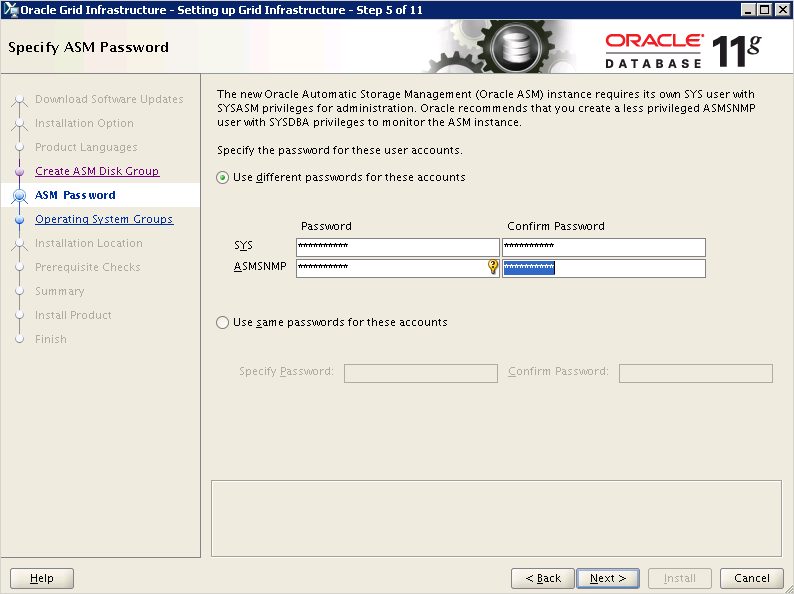
5) In Oracle 11gR2 we have a new "SYSASM" Privilege to manage the ASM instance. Provide the password for the same.


 6) Once the all the prerequisite are met, you will receive the "install" screen


7) At the end execute "root.sh" as a root user and complete the installation.


8) Verify whether the ASM instance is created and
   
        [oracle@coltdb04 grid]$ sqlplus

        SQL*Plus: Release 11.2.0.3.0 Production on Thu Jun 28 02:58:10 2012

        Copyright (c) 1982, 2011, Oracle.  All rights reserved.

        Enter user-name: / as sysasm

       Connected to:
       Oracle Database 11g Enterprise Edition Release 11.2.0.3.0 - 64bit Production
       With the Automatic Storage Management option


       SQL> select INSTANCE_NAME,VERSION,STATUS from v$instance;

                  INSTANCE_NAME    VERSION           STATUS
                   ---------------- ----------------- ------------
                          +ASM             11.2.0.3.0        STARTED


       SQL> select NAME,STATE,TOTAL_MB,FREE_MB,COMPATIBILITY from                  V$ASM_DISKGROUP;

              NAME                           STATE         TOTAL_MB    FREE_MB
              ------------------------------ -----------             ----------          ----------


                 DATA                           MOUNTED           4777       4718


Monday, 14 May 2012

Oracle 11g Feature and Option Availability Matrix


The following table outlines the database features and options associated with each edition of
Oracle Database 11g.

FEATURE/OPTION
SE1
SE
EE
NOTES
HIGH AVAILABILITY

Oracle Data Guard Redo Apply
N
N
Y

Oracle Data Guard SQL Apply
N
N
Y

Oracle Data Guard—Snapshot Standby
N
N
Y

Oracle Active Data Guard
N
N
Y
Enterprise Option
(Active Data Guard)
Oracle Data Guard – Network Compression
N
N
Y
Enterprise Option (Advanced Compression Option)
Basic Standby Database (Manually managed)
Y
Y
Y

Rolling Upgrades – Patch Set, Database and O/S
N
N
Y

Fast-Start Fault Recovery
N
N
Y

Online index rebuild
N
N
Y

Online index-organized table reorganization
N
N
Y
via ALTER TABLE MOVE ONLINE
Online table redefinition
N
N
Y
via DBMS_REDEFINITI ON
Online system changes CPU, disk, memory
Y
Y
Y

Flashback Query
Y
Y
Y

Flashback Table
N
N
Y

Flashback Database
N
N
Y

Flashback Transaction
N
N
Y

Flashback Transaction Query
N
N
Y

Flashback Data Archive (“Oracle Total Recall”)
N
N
Y
Enterprise Option
Block Level Media Recovery
N
N
Y

Online Backup and Recovery
Y
Y
Y

Incremental Backup and Recovery
Y
Y
Y
EE only: fast incremental backups available via
change tracking
Unused Block Compression in Backups
N
N
Y

Parallel Backup and Recovery
N
N
Y

Default RMAN Compression (BZIP2)
Y
Y
Y

Fast RMAN Compression (ZLIB)
N
N
Y
Enterprise Option (Advanced Compression Option)
Point-in-time Tablespace Recovery
N
N
Y

Trial Recovery
N
N
Y

Oracle Fail Safe
Y
Y
Y
Windows only
Data Recovery Advisor
Y
Y
Y

Transaction Application Failover
Y
Y
Y

PERFORMANCE & SCALABILITY

Oracle Real Application Clusters
N
Y
Y
Enterprise Option, and included with SE
Oracle Clusterware
Y
Y
Y

Automatic Workload Management
N
Y
Y
Requires RAC
Support for Oracle Exadata Storage Server
N
N
Y

In-Memory Database Cache
N
N
Y
Enterprise Option
SECURITY


Oracle Advanced Security
N
N
Y
Enterprise Option
Oracle Label Security
N
N
Y
Enterprise Option
Data Masking Pack
N
N
Y
Enterprise Option
Encryption Toolkit
Y
Y
Y

Fine Grained Auditing
N
N
Y

Secure Application Role
N
N
Y

DEVELOPMENT PLATFORM

Java Support
Y
Y
Y

Database Web Services
Y
Y
Y

SQLJ
Y
Y
Y

JDBC Drivers
Y
Y
Y

XML Support in Database
Y
Y
Y
Includes Binary XML, XML Object- Relational, XML Index, XML Repository
XQuery
Y
Y
Y

Objects and Extensibility
Y
Y
Y

Regular Expressions
Y
Y
Y

PL/SQL Stored Procedures and Triggers
Y
Y
Y

PL/SQL Server Pages
Y
Y
Y

Java Server Pages
Y
Y
Y

Java Native Compilation
Y
Y
Y

PL/SQL Native Compilation
Y
Y
Y

PL/SQL Function Result Cache
N
N
Y

Client Side Query Cache
N
N
Y

Oracle Developer Tools for Visual Studio Net
Y
Y
Y
Windows Only
Microsoft Distributed Transaction Coordinator Support
Y
Y
Y
Windows Only
Active Directory Integration
Y
Y
Y
Windows Only
Native .NET Data Provider ODP.NET
Y
Y
Y
Windows Only
.NET Stored Procedures
Y
Y
Y
Windows Only
Globalization Support
Y
Y
Y

Application Express
Y
Y
Y

SQL*Plus
Y
Y
Y

SQL Developer
Y
Y
Y

MANAGEABILITY

Oracle Change Management Pack
N
N
Y
Enterprise Option
Oracle Configuration Management Pack
N
N
Y
Enterprise Option
Oracle Diagnostic Pack
N
N
Y
Enterprise Option
Oracle Tuning Pack
N
N
Y
Enterprise Option
Oracle Provisioning and Patch Automation Pack
N
N
Y
Enterprise Option
Fast, Lightweight Server Install
Y
Y
Y

Easy Client Install
Y
Y
Y

Oracle Enterprise Manager Database Control
Y
Y
Y

Automatic Memory management
Y
Y
Y

Automatic Storage management
Y
Y
Y

Automatic Undo management
Y
Y
Y

Automatic Statistics management
Y
Y
Y

Server Managed Backup and Recover (RMAN)
Y
Y
Y

Automatic Backup/Recovery to Flash Recovery Area
Y
Y
Y

Duplexed Backup Sets
N
N
Y

Server-Generated Alerts
Y
Y
Y

End-to-End Application Testing
Y
Y
Y

Database Resource Manager
N
N
Y

SQL Plan Management
N
N
Y

Resumable Space Allocation
Y
Y
Y

VLDB, DATA WAREHOUSING, BUSINESS INTELLIGENCE

Oracle Partitioning
N
N
Y
Enterprise option
Oracle OLAP
N
N
Y
Enterprise option
Oracle Data Mining
N
N
Y
Enterprise option
Direct Load Data Compression
N
N
Y

OLTP Compression
N
N
Y
Enterprise Option (Advanced Compression Option)
SQL Analytics Functions
Y
Y
Y

Bitmapped index and Bitmapped Join Index
N
N
Y

Function-Based Index
Y
Y
Y

Parallel Query/DML
N
N
Y

Parallel Statistics Gathering
N
N
Y

Parallel Index Build/Scans
N
N
Y

Parallel Data Pump Export/Import
N
N
Y
SE Non-Parallel Data
Pump only
Data Pump Compression
N
N
Y
Enterprise Option (Advanced Compression Option)
Export Transportable Tablespace, including Cross-Platform
N
N
Y

Import Transportable Tablespace
Y
Y
Y

Star Query Transformation
Y
Y
Y
SE B-Tree Indexes
Only
Sample Scan
Y
Y
Y

Summary Management – Materialized View Creation and Refresh
Y
Y
Y

Summary Management Materialized View Query Rewrite
N
N
Y

Direct Path Load API
Y
Y
Y

External Tables
Y
Y
Y

SQL Model
Y
Y
Y

Synchronous Change Data Capture
Y
Y
Y

Asynchronous Change Data Capture
N
N
Y

Query Rewrite Cache
N
N
Y

INTEGRATON

Oracle Streams
Y
Y
Y
SE1/SE no Asynchronous Capture from Log File (Online Redo or Archive)
Oracle Streams Advanced Queuing
Y
Y
Y

Messaging Gateway
N
N
Y

Basic Replication
Y
Y
Y
Read only and updateable materialized views. Also single master for updateable MVs and multi-tier MVs.
Advanced replication
N
N
Y
Multi-Master
Replication
Distributed Queries/Transactions
Y
Y
Y

Job Scheduler
Y
Y
Y

External Procedures
Y
Y
Y

Generic Connectivity
Y
Y
Y

Transparent Gateways
Y
Y
Y
Licensed separately for SE/EE
NETWORKING

Connection Pooling
Y
Y
Y

Oracle Connection manager
N
N
Y

Infiniband Support
N
N
Y

CONTENT

Oracle Spatial
N
N
Y
Enterprise Option
Semantic Technologies (RDF/OWL)
N
N
Y
Requires Spatial, Advanced Compression and Partitioning Options
Oracle Locator
Y
Y
Y

Oracle Workspace manager
Y
Y
Y

Medial Images (DICOM)
Y
Y
Y

Multimedia
Y
Y
Y

Oracle Text
Y
Y
Y

SecureFiles
Y
Y
Y
Compression, deduplication are part of an Enterprise Option (Advanced Compression
Option). Encryption is part of an Enterprise Option (Advanced Security Option)
ADDITIONAL DATABASE FEATURES

Database Event Triggers
Y
Y
Y

Drop Column
Y
Y
Y

Rename Column, Constraint
Y
Y
Y

Virtual Column
Y
Y
Y
Use of virtual columns as primary keys or foreign keys require EE and Oracle Partitioning Option
Invisible Indexes
Y
Y
Y

Index-Organized Tables
Y
Y
Y

Instead-of Triggers
Y
Y
Y

LOB (Large Object) Support
Y
Y
Y

LogMiner
Y
Y
Y

Multiple Block Size Support
Y
Y
Y

Temporary Table
Y
Y
Y